

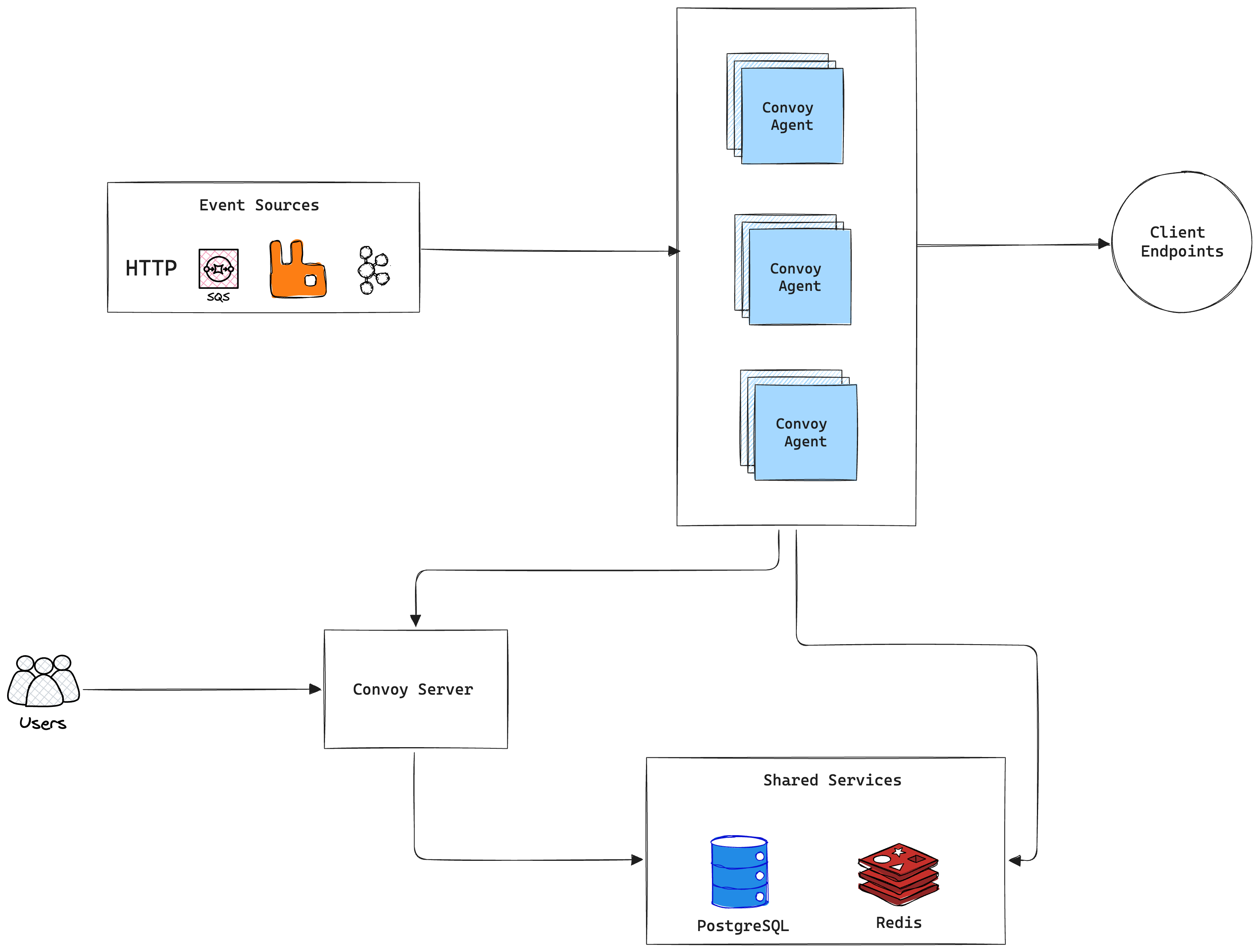
Components
Let’s break down the image above by describing the important elements.Server
The API Server hosts Convoy’s REST API that powers the dashboard, and all HTTP SDK functions. When events are sent through the API, they are immediately enqueued to Redis, where an agent picks it up and persists the events into the database, before dispatching to endpoints. We iterate at a fast pace and often release new features, we try our best to make it backward compatible while shipping new exciting features. When there are breaking changes, we explicitly communicate them in the Release Notes. The API Server is a stateless service, and can be scaled horizontally. We suggest that you deploy them behind a load balancer to properly distribute traffic among the instances. See the CLI details here.Sizing guidance: For standard production deployments, the recommended starting point is 1 vCPU (1000m) and 2GB of RAM (2000Mi) per Server replica. The Server is stateless and can be scaled horizontally behind a load balancer.
Agent
The agent combines the capabilities of the worker and ingest components, making it easier to reason about and keeping the architecture simple. These instances are responsible for the following:- Asynchronous Task Processing: Processing all asynchronous tasks in the queue. These can range from important functions like processing webhook events to ancillary tasks like sending emails, purging stale events (retention policies) etc. These workers are designed to be stateless and can be scaled horizontally to increase the throughput of the entire system.
- Message Brokers Integration: These stateless workers are used to consume webhook events from message brokers. They poll source configuration from the database and consume events from the broker and write it to the redis queue.
Sizing guidance: Use the same starting point as the Server: 1 vCPU (1000m) and 2GB of RAM (2000Mi) per Agent replica for typical production workloads. The Agent is stateless; add replicas to increase throughput (queue consumption, broker ingest, and deliveries). Heavy broker fan-in or large payloads may require more CPU or memory per replica.
Egress
The egress service is an HTTP Connect Proxy that is directly responsible for sending webhook events to the client endpoints. These services provide two major benefits:- Static IPs: because it is a connect-proxy, we are able to maintain a predefined set of IP address on all requests forwarded to client endpoints.
- Security: The egress service prevents Server-Side Request Forgery (SSRF) by creating a blocklist of URLs that cannot receive requests to prevent malicious users from triggering unexpected behaviours in your environment.
Sizing guidance: Treat each egress instance like a stateless proxy: a practical starting point is 1 vCPU (1000m) and 2GB of RAM (2000Mi) per instance, then raise resources if you see high concurrent outbound connections or large response bodies. Keep at least three instances behind a load balancer for availability, as described above.
Third-Party Dependencies
PostgreSQL 15+
Postgres is used as for the following- Primary data store
- Search backend
read_replicas or read_replica_dsn settings to distribute read queries, improving dashboard and retrieval performance. The connection pool defaults are tuned at max_open_conn: 10, max_idle_conn: 10, and conn_max_lifetime: 10.
Sizing guidance: For a modest production footprint, plan for at least 2 vCPU and 4GB RAM on the primary Postgres node, with fast disk (IOPS) for the working set. Grow CPU, memory, and storage as event and delivery volume increase, and add read replicas before the primary becomes read-saturated.
Redis 6+
Redis is used for a number of operations, namely- Caching
- Job queueing
- Rate limiting
- Circuit breaking
Sizing guidance: Start with at least 2–4GB RAM in production so queues, cache, and rate-limit state have headroom; scale memory with peak backlog, payload size, and number of Agents. Pair sizing with Redis Sentinel or a managed HA deployment so Redis is not a single point of failure.
Benchmarks & Performance
While absolute throughput depends heavily on your underlying infrastructure (CPU, Memory, IOPS), Convoy is designed for sub-second latencies using its control and data plane architecture. For organizations processing millions of events per month, horizontal scaling of the Agent nodes, configuring Redis Sentinel for high availability, and utilizing Postgres read replicas is strongly recommended. To measure capacity on your own cluster, use convoy-bench. The repo ships scripts and configs for load-testing Convoy with k6 and Go, including HTTP ingest/outgoing flows and broker-backed producers (SQS, Pub/Sub, Kafka). See the README for./bench.sh options, prerequisites, and examples.